Thursday, June 16, 2011

Walking the Talk of #Edtech

Pop quiz: You get invited to teach a class as an acting superintendent to principals who want to be superintendents. You are a huge #edtech advocate. What do you do? My answer is to walk the talk. For those of you who have been inspired by Scott McLeod like I have, this is an interesting case study. Here's what I tried to do:

  • I started with a Google Site and embedded the syllabus as a Google Doc. (It's my first time teaching the course so the syllabus is still a bit raw.)


  • I then used David Warlick's method of incorporating backchannel class dialogue, capturing an entire different element to the class, including aggregated class notes, idea processing, informal Q and A between classmates, and the real-time documentation of a hype-local personal learning network. It's much like a fused class journal documenting the learning  After each class, I copy and paste the dialogue into a Google Doc, answer questions and respond to interesting exchanges. 


    • Next, I mimicked Michael Wesch and had each student in the class set up a blog, collected the RSS feeds for the each blog's posts and comments, used Yahoo Pipes to consolidate the feeds into one pipe output, which I embedded into the Google Site. 


    • To provide an integrated environment for threaded discussion, I used Google Groups to post questions and allow students to thoughtfully exchange ideas and responses. 


    • In order to provide primary sources and other materials from which to build constructivist/project-based learning experiences, I have uploaded all the class resources to a "file cabinet" webpage. 


    • Finally, I've embedded the RSS feed from a Diigo social bookmarking group, allowing for "current events" discussions and opportunities for real-life case studies. This is also a Michael Wesch specialty. 


    The class has met once so far, and it is going well, but not without problems. Introducing prospective district-level leaders to the complexities of the superintendency is a large enough task on its own. The challenge of  #edtech integration is admittedly still more characteristic of experiment than of full amplification. I sense that basic digitally-oriented skills such as tab management and password organization are hurdles on which we'll have to continue to work. And I don't even want to talk about access to electrical outlets or adequate access to WiFi.

    I'd love feedback on my effort to walk the talk. How have all of you walked the talk? How have you navigated through the assessment puzzle of content standards, technology, and project-based assessment?

    Friday, June 10, 2011

    Don't be the Droning District Administrator

    I recently had a terrible experience: I sat for a full hour watching a PowerPoint presentation with tired backgrounds, cheesy clip art, and crowded slides that were poorly ordered--all accompanied by monotone, self-promoting lecture. Argh. The experience inspired some self-reflection and this blog post. I know that I've been guilty of it too: the mind-numbing PowerPoint. I've fallen in to the stereotype of the droning district administrator. It's sort of like sentencing your audience to death by PowerPoint. We can do better. If we reformulate our approach to the actual presentations and incorporate social media opportunities, we can be more effective in how we convey, engage, and influence.

    Think of the possibility of transforming annual meetings, community listening sessions, and referenda informational meetings into high-engagement occasions where we can remedy misinformation and purposefully clarify ambiguities. It's our chance to allow parents and community stakeholders to . . .
    • easily access accurate information,  
    • allow for a forum of discussion (which they are going to have anyhow) in a place where people access to infographics, slideshows, and/ or videos,
    • impel the facts through social networks that we don't normally have access to. 
    Let's begin first by looking at how we present. Garr Reynold's of Presentation Zen is exceedingly insightful in his recommendations. He breaks his recommendations up into three basic areas: Organization and preparation tips, delivery tips, and slide tips, all of which are immediately useful and stylishly perceptive.

    Here, Reynolds talks to a group of Google employees about his expertise in 2008. Some of his references are a bit outdated, but the advice still holds very strong.


    Jazzing up the actual PowerPoint isn't the only thing you should do to prevent the dull, sleep-inducing  ambiance of the typical presentation. By appropriately incorporating social media into your presentation, you also allow your message to reach a larger audience and allow for a method of discourse.

    Take, for example, Brian Solis's graphic below on how to extend the influence of your presentation by utilizing social media. This is as much a measure engagement as it is a way to let your presentation (as Solis says) "resonate."

    According to Solis, before presenting at all, we should listen in order to establish who the audience is and what the critical issues are. The progression of creation, presenting, broadcasting, measuring and finally adapting is latent with opportunity to research with Ning, develop context and content with Google Forms, send and receive messages with back-channels during presentations, participate in the audience debriefing after the presentation through Twitter, measure echo and accuracy your message through Facebook, and finally modify your message in response to ambiguity via a blog.


    Connecting to Your Audience by Nancy Duarte

    We've all been there: Low-light, water glasses and ice click, a cherry-wood podium, a guy a with tie reading from slides. Take a step into what seems unconventional but really is more effective by recalibrating how you present and how you purposefully strengthen your message.

    Friday, May 20, 2011

    The Deliberate Practice of Edtech Leadership

    I love the concept of deliberate leadership, of purposefully exerted action aligned to vision. To act with thoughtful and calculated enterprise requires an acute understanding of the end-game to which you are leading, which is why I appreciate ISTE's work on "Essential Conditions."

    Like most "best-practice" lists, many of the conditions are cross-pollinating, organic rather than sequential, auto-catalytic, and fluid in priority as other conditions become more critical. And of course, it's easy to recognize a high-functioning system when you see it, but that's not the dilemma. The catch is where to start?

    I get this question all the time. What should school leaders do first? Where should we best begin the process in order to increase the likelihood of success? The answer, unfortunately, is depended not on an endorsed method but more on the existing qualities of the people and the characteristics of the places targeted for innovation.

    Through the lens of a district-level leader, the first and most essential measure that a leader can begin is an awareness of and personal competence in digital-age tools within a burgeoning digitally-oriented professional learning community. This may look like a group of administrators amusing ourselves with technology, but it may be the most important step of deliberate practice an administrator can take in order to develop the essential conditions of technology-integrated educational environments. The next step is a "systems" approach to working incrementally on the ISTE "Essential Conditions," most important of which is the "Shared Vision" condition.

    What do you think? Where should a school leader begin to exert deliberate leadership in the process of edtech transformation? Should you have a balance of personal and system development? Is there one essential condition that is significantly more important than another?


    Friday, May 13, 2011

    The Mobile-Savvy Superintendent

    Raise your hand if you have a smartphone. Now, raise your hand if you frequently tweet, socially bookmark, or access shared documents on your smartphone. Just as I thought: We've got a mass epidemic of underutilization and ignorance within the ranks of superintendents who vainly carry smartphones in their breast pockets. It's like using Taylor-Made golf clubs on a miniature golf course. They are only using "bars" instead of using mobile bandwidth.

    So, what does the "mobile-savvy" superintendent look like? This graphic (by Brian Solis) does an excellent job of visually representing the variables at play. We use smartphones socially (professionally speaking) in real-time, where ever and whenever we want. We choose the personalized device that fits our needs the best, and then install the best apps to allow us to engage in relationships and networks (PLNs and PLCs).

    For the sake of example by way of vignette: A busy (and mobile-savvy) superintendent finishes a school district stakeholder meeting early, boots up her smartphone, and posts a community member compliment about the new school nutrition program to her twitter account (an mode of communication that reaches 1200 of her "followers" instantly). She then opens her Google Reader App, and quickly scrolls through her blogroll in order to stay current on evocative issues and happenings. She notices a piece on "BYOL," then bookmarks and comments on the piece via the Diigo App to her district-wide technology innovation group, who has been looking into creative ways for allowing students to bring their own laptops to school. She'll check the groups' responses to the piece later. A Google Calendar reminder pops up to prompt her to the next appointment, so she opens the GPS App as she's walking to her car, verbally directs the App to provide her directions to downtown chamber of commerce building, hops in her car and allows the GPS to do the  dirty work as she thinks about her speech, which she realizes is sitting on her desk at central office. Upon arrival, she finds the Google Doc on her smartphone, and sends it to the chamber of commerce secretary who then prints off a fresh version for the speech. 


    Most superintendents, however, are just using their smartphones for texting, making phone calls, and checking emails. Their underutilization (or low-capacity use) of the smartphone may point to more than just a lack of technology know-how. The subscript to the squandered-away opportunity speaks to their connectedness, or their contribution to and participation in digitally-oriented professional networks and relationships.

    The meaningful utilization of a smartphone is just the tangible demonstration of the extent to which a learner participates in a personal learning network and a digitally-oriented professional learning community. So, if you want to be a "mobile-savvy" superintendent, it depends less on the smartphone you buy and more upon the professional communities to which you meaningfully contribute.

    Monday, May 9, 2011

    What's on the "Horizon"

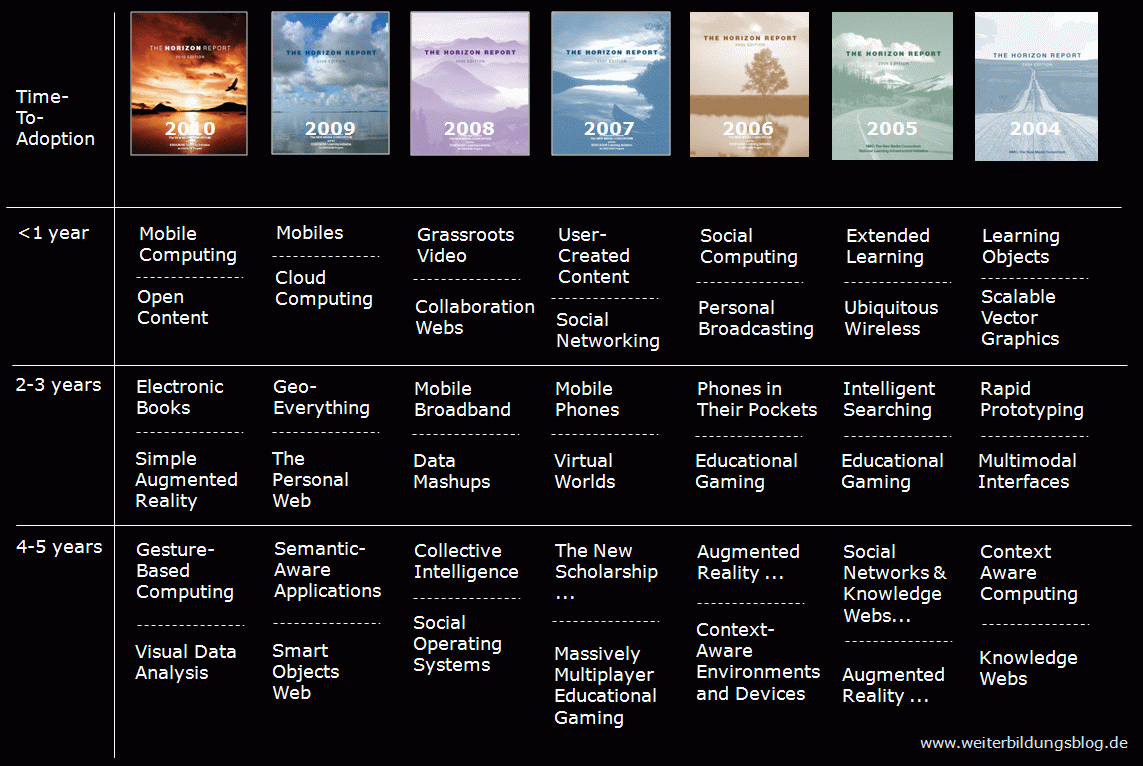
    Many of you are already very familiar with the annually submitted "Horizon Report" by the New Media Consortium. Trend analysis is one of the most important skills a district-level leader can apply when strategic planning, designing staffing levels, allocating resources, updating polices, and the list goes on.

    The NMC has been extraordinarily accurate in their forecasts over the last seven years, as seen below in a graphic that neatly arranges their previous predictions. What is most interesting is both the scalability of some trends versus the one-dimensional/false promise of others.


    Recently, the NMC released this year's report, which includes recognition of innovations such as ebooks, augmented reality, game-based learning, and gesture-based learning. Below is NMC's ppt on the 2011 report.


    View more presentations from New Media Consortium

    NMC, however, is not the only resource a district administrator may look to in order to become more aware of upcoming drivers of change. Gartner's "Hype Cycle" of emerging technology trends is another valuable resource where information may be gleaned and applied. The format of visually seeing the excitement, disenchantment, and realized function of digital-age tools is not only comical put also alerting.


    For a more global perspective, the Knowledgeworks Foundation has completed the 2020 Forecast for education, citing catalysts, trends, signals, and learning agents.

    So, why look to the horizon? Why pull our heads up from the grindstone (or guillotine)? Does anyone else feel off balance with rapid changes to the learning landscape shifting our equilibrium, and techno experts volleying recommendations without research and careful consideration? Are we as district administrators at somewhat of a disadvantage if not logged on, plugged in, and growing in a personal learning network? Offline school administrators will likely be looking through a myopic, fiscal-year lens, be uninformed of emerging innovations, and recoiling from transformative forces. A visionary leader is predictive in strategic planning, experimental in programming, and engaged in trend analysis. Use the resources above to "turn your brights on" and build an awareness of what's on the horizon!


    Friday, April 29, 2011

    Something "Wired" This Way Comes

    Recently, Scott McLeod wrote about 12 predictions for the future of learning. In an effort to demystify the list for my colleagues, I've informally set out to write about each of the predictions, some of which I've already written. On April 14, I wrote about the mobile movement. On March 25th, I presented a video on gaming from James Paul Gee, who can encapsulate the concept much better than I ever could. This is the next installment. 


    McLeod's other predictions about the future of learning (beyond the two cited above) include, 
    • digital learning rather than analog/ink on paper
    • online, 
    • networked/interconnected, 
    • multimedia rich, 
    • self-directed/inquiry-based, 
    • open/accessible (in the sense of open educational resources), and 
    • project-based. 


    The challenge, then, is to find an example of a current tool or mechanism that embodies all of these characteristics of what learning will be like in the future. Is there a legitimate educational example that is digital, online, socially networked and open but media rich and inquiry/project-based? A tall order indeed. Enter, MOOC, or a massive open online course. 


    Although a bit Utopian, the concept of a MOOC does illustrate all the characteristics of McLeod's predictions for learning in the future. No, this particular presentation of the concept does not address how it would deal with complexities such as poverty, learning disabilities, deliberately planned curricular scope and sequence, alignment to rigorous (core) standards, accessibility to bandwidth/hardware, appropriateness of content to developmental level, formative assessment and subsequent instructional adjustments, summative assessment and subsequent parental and mandated state/federal reporting of student progress, or student motivation. 


    This does, however, allow us to get a glimpse of pedagogical possibility, especially possibility beyond our restrictive and traditional brick-and-mortar-school doctrine and paradigm. And, as you just read, it's easy to posit why an idea or concept will not work, but what if we imagined how a MOOC could work in K-12 education? Any suggestions?

    Friday, April 15, 2011

    District Administrators, Can You Hear Me Now?

    I've written before about the possible elements that will drive change in the field of education; one of these drivers of change is the mobile learning movement, which gives affordable, widely accessible (in terms of cell signal and 3G), and completely persuasive opportunities for communicating, learning, and consuming. These devices require low maintenance on behalf of our tech departments, gain access to bandwidth through means that we don't provide, are low cost--student owned--and entirely personalized for personalized learning.

    I know district administrators who own smartphones but only use a fraction of their capability; I know superintendents who unequivocally reject what smartphones do and what they stand for; I also know administrators who are crafty users of smartphones but still don't appreciate them as a  viable alternative in 1:1 environments. So, here's an overview.

    Here is a review of the movement of mobile access:


    Here's how we can use them to connect and learn:


    Here's some of their strengths, weaknesses, opportunities, and threats as the movement of mobile access relates to learning:


    Here is an example of what the use of mobile access could look like:
    Using Mobile Devices with Teaching & Learning
    View more presentations from Michael M Grant


    Here is a framework for approaching mobile learning:


    Here are some resources and current thinking on mobile learning: