Sunday, September 18, 2011
Digital Mentors for District Administrators
Three years ago while at an ASCD conference, I heard Don Tapscott talk about digital mentors. The concept resonated with me. He talked about having three "digital natives" as technology mentors to keep him up to date, to help him work through issues, and to give him advice when needed. I love this idea. As Tapscott says, "Don't be afraid; learn from the N-Geners." Procter and Gamble have apparently endorsed the concept of "reverse mentoring" to the extent of creating a mentoring program where N-Geners mentor veteran employees.
I have three digital mentors. Cord Blomquist, my brother-in-law, runs Ready Made Web. I can't thank him enough for his assistance in troubleshooting hardware problems, his advice on technology purchases, and his annual family CPU maintanence visit. Brandon Resheske is my second digital mentor. Always available, never makes me feel like I've just asked a dumb question, Brandon is my Google buddy. From experimenting with Google Wave (ing goodbye:-) to Buzz, to Google+, he's always had time for me. Last and probably most influential is Dan Berg. He's the man. He's my gaming guy, my mobile go-to expert, and my html resource. He's the guy who had enough patience to help me through Xampp, and Filezilla, and Hostmonster, and Wordpress trouble shooting, and the list goes on. Thanks, guys, for all the help.
I am, indeed, fortunate to have access to expertise, but I also sought out these relationships. What is most important is that district administrators are open to exposing our weaknesses and learning new things from others who may not have our professional status. We need to transition from being the mentors to being mentor-able. So often, we are the the talking heads with all the answers, where the buck stops. For district administrators to not be held hostage to our ignorance and pride, we need assistance, most likely from a younger generation who may not have the same education or career rank. We need to get over it.
Look around you. It could be a brother-in-law, a colleague, a niece, or a neighbor's son. Let your self-importance fall away, and start the conversation. Power up with a digital mentor, log in, and step into the stream.
Friday, August 19, 2011
The #Edtech "Walk the Talk" Autopsy
So much has happened since last we spoke! In June, I posted content about my best plan to "walk the talk" of #edtech. I taught two graduate courses: one to teachers working to earn principal certification, and one to principals working to earn superintendent certification. My goal was simple: To walk my talk, and to actually "do" what I "ask" people to do.
My vision, as idealistic and "green" as a first-year-teacher," was to build constructivist experiences around essential questions through the blended integration of accessible and free technology. What follows is the autopsy.
- Tab management on desktops continued to be a challenge for any generation of student if he or she did not already frequently use technology. The process of registering or "signing up" for Web 2.0 applications was also a challenge, with things like captcha and/or mobile text confirmations codes. Password organization also plagued the group with frequent bottlenecks. We eventually began using "problem pairs" as a cooperative learning tool to work collaboratively through minor technology issues.
- Once the "announcements" section on the class webpage was established as a place for information and dialogue to clear up ambiguities, everything went much better. Next time I teach a blended class, I will emphasize this resource better in order to head off issues before people get frustrated.
- The time I spent getting students oriented to the nuances of each Web 2.0 application paid off in student confidence and better (and more prompt) collaboration and interaction later. Each Web 2.0 application is a bit different in how posts are published, how html code is embedded, and even how to view the "home" location. I found out quickly that students needed large group and small group process time to gain the experience needed to effectively navigate through different Web 2.0 applications.
- I learned that the innate communication aim and intent for each Web 2.0 application is significantly different (with a little help from @mcleod). It turns out that the purpose of one digitally-oriented tool is completely different than another even though they overlap in publishing characteristics. Indeed, the published post of a blog made most sense (in my class setting) when the primary audience was the teacher. The peer comments on individual blog posts maintained a narrow focus without room for applicable but tangential dialogue. The published post of a comment within a discussion thread (say in Google Groups) has a more peer-based audience, and students had the ability to shoot off on ancillary sub-discussion threads. Backchannel transcripts turn out to be an almost intimate, stream-of-consciousness diary of aggregate reflection and playful multi-directional teasing, not meant for anything but formative assessment. Wikis (I used a shared Google Document.) in this setting worked best as a communal opportunity for whole class collaboration. The development of the template for artifact reflection (all of which were included in a portfolio) worked exceedingly well as a large group opportunity for student input on summative assessment.
- Problems were as much the "glitchiness" of the tools we were using as it was breaking our conception that each of us are individual silos of learning. Indeed, Google Groups would flake out and not allow certain students to post for no reason at all, or Capzles would freeze without reason. However, it was our traditionally tilted paradigms of exclusive and private learning that hampered our progress for inclusive and aggregate learning in an environment amplified with digital-age tools. I found that the backchannel was most useful in breaking that notion, allowing students to glimpse the the interface between crowdsourcing in a classroom and powerful learning.
- This is a big one: Device uniformity does not matter as much as browser uniformity. To create an environment that focuses more on constructivist learning activities and less on technology hiccups requires a common vocabulary for navigation through Web 2.0 applications, similar tab management features, etc. I found the solution to be a strong recommendation for everyone to use the same web browser.
- The students loved Skype. I am grateful Deb Gurke, Joe Schroeder, and Peggy Hinckley for taking time on a Saturday to talk to the class. The students loved it, the content was timely, and the examples were real.
- The concept of "share settings" is not complex after you've experimented with using it, but for the novice, the concept is daunting at the start. Like most of these observations, the more time I spend modeling in large group and capitalizing on "educational moments," the better students utilized the feature.
- Constructivist activities within cooperative learning groups are already difficult to develop and facilitate, but when digital-oriented tools are added to the mix, the complexity was at first overwhelming. Honestly, I used the book, Total Participation Techniques, as a starting point, and then matched the technique to the Web 2.0 application, whether it was a comment on the day's backchannel, some contribution to a wiki list, a post to a discussion thread on Google Groups, a Wordle (as trite as it may now be), or a Google Form. The dialogue of PLNs naturally ebbs and flows between different Web 2.0 applications pending preference, novelty, functionality, etc. To deliberately design experiences matching critical thinking to the most suitable digitally-oriented tool was a more difficult task than I expected.
- I gave students the option of submitting the summative-assessment portfolio as a Google Collection (which is a collection of shared folders, all of which contain shared documents). Once students understood the concept, they enjoyed the option, and I did too.
In retrospect, the class was quite the endeavor. Students were symmetrically learning about the content of the class and the digital applications used to facilitate the learning. Student feedback, however, was exceedingly positive and appreciative. Accordingly, the myth narrative that educators are reluctant to "jump in" and learn about and use digitally-oriented learning tools is wholly false. If this experience is any indication of the larger educational community, the problem (or "big fricking wall as @mcleod calls it) is not as much fear, ambition, or traditionalism, but is rich exposure, deep access, and productive experiences within staff development opportunities.
What a lesson! I genuinely encourage you to seek-out experiences to "walk the talk" of #edtech and actually "do" what we "ask" others to do! If you've "walked the talk", I'd love to hear about your experiences. If anyone has "best practice" recommendations in facilitating blended classroom instruction, I'd enjoy your comments!
Thursday, June 16, 2011
Walking the Talk of #Edtech
Pop quiz: You get invited to teach a class as an acting superintendent to principals who want to be superintendents. You are a huge #edtech advocate. What do you do? My answer is to walk the talk. For those of you who have been inspired by Scott McLeod like I have, this is an interesting case study. Here's what I tried to do:

The class has met once so far, and it is going well, but not without problems. Introducing prospective district-level leaders to the complexities of the superintendency is a large enough task on its own. The challenge of #edtech integration is admittedly still more characteristic of experiment than of full amplification. I sense that basic digitally-oriented skills such as tab management and password organization are hurdles on which we'll have to continue to work. And I don't even want to talk about access to electrical outlets or adequate access to WiFi.
I'd love feedback on my effort to walk the talk. How have all of you walked the talk? How have you navigated through the assessment puzzle of content standards, technology, and project-based assessment?
- I started with a Google Site and embedded the syllabus as a Google Doc. (It's my first time teaching the course so the syllabus is still a bit raw.)
- I then used David Warlick's method of incorporating backchannel class dialogue, capturing an entire different element to the class, including aggregated class notes, idea processing, informal Q and A between classmates, and the real-time documentation of a hype-local personal learning network. It's much like a fused class journal documenting the learning After each class, I copy and paste the dialogue into a Google Doc, answer questions and respond to interesting exchanges.
- Next, I mimicked Michael Wesch and had each student in the class set up a blog, collected the RSS feeds for the each blog's posts and comments, used Yahoo Pipes to consolidate the feeds into one pipe output, which I embedded into the Google Site.
- To provide an integrated environment for threaded discussion, I used Google Groups to post questions and allow students to thoughtfully exchange ideas and responses.
- In order to provide primary sources and other materials from which to build constructivist/project-based learning experiences, I have uploaded all the class resources to a "file cabinet" webpage.
- Finally, I've embedded the RSS feed from a Diigo social bookmarking group, allowing for "current events" discussions and opportunities for real-life case studies. This is also a Michael Wesch specialty.

The class has met once so far, and it is going well, but not without problems. Introducing prospective district-level leaders to the complexities of the superintendency is a large enough task on its own. The challenge of #edtech integration is admittedly still more characteristic of experiment than of full amplification. I sense that basic digitally-oriented skills such as tab management and password organization are hurdles on which we'll have to continue to work. And I don't even want to talk about access to electrical outlets or adequate access to WiFi.
I'd love feedback on my effort to walk the talk. How have all of you walked the talk? How have you navigated through the assessment puzzle of content standards, technology, and project-based assessment?
Friday, June 10, 2011
Don't be the Droning District Administrator
I recently had a terrible experience: I sat for a full hour watching a PowerPoint presentation with tired backgrounds, cheesy clip art, and crowded slides that were poorly ordered--all accompanied by monotone, self-promoting lecture. Argh. The experience inspired some self-reflection and this blog post. I know that I've been guilty of it too: the mind-numbing PowerPoint. I've fallen in to the stereotype of the droning district administrator. It's sort of like sentencing your audience to death by PowerPoint. We can do better. If we reformulate our approach to the actual presentations and incorporate social media opportunities, we can be more effective in how we convey, engage, and influence.
Think of the possibility of transforming annual meetings, community listening sessions, and referenda informational meetings into high-engagement occasions where we can remedy misinformation and purposefully clarify ambiguities. It's our chance to allow parents and community stakeholders to . . .
Here, Reynolds talks to a group of Google employees about his expertise in 2008. Some of his references are a bit outdated, but the advice still holds very strong.
Jazzing up the actual PowerPoint isn't the only thing you should do to prevent the dull, sleep-inducing ambiance of the typical presentation. By appropriately incorporating social media into your presentation, you also allow your message to reach a larger audience and allow for a method of discourse.
Take, for example, Brian Solis's graphic below on how to extend the influence of your presentation by utilizing social media. This is as much a measure engagement as it is a way to let your presentation (as Solis says) "resonate."
According to Solis, before presenting at all, we should listen in order to establish who the audience is and what the critical issues are. The progression of creation, presenting, broadcasting, measuring and finally adapting is latent with opportunity to research with Ning, develop context and content with Google Forms, send and receive messages with back-channels during presentations, participate in the audience debriefing after the presentation through Twitter, measure echo and accuracy your message through Facebook, and finally modify your message in response to ambiguity via a blog.

We've all been there: Low-light, water glasses and ice click, a cherry-wood podium, a guy a with tie reading from slides. Take a step into what seems unconventional but really is more effective by recalibrating how you present and how you purposefully strengthen your message.
Think of the possibility of transforming annual meetings, community listening sessions, and referenda informational meetings into high-engagement occasions where we can remedy misinformation and purposefully clarify ambiguities. It's our chance to allow parents and community stakeholders to . . .
- easily access accurate information,
- allow for a forum of discussion (which they are going to have anyhow) in a place where people access to infographics, slideshows, and/ or videos,
- impel the facts through social networks that we don't normally have access to.
Here, Reynolds talks to a group of Google employees about his expertise in 2008. Some of his references are a bit outdated, but the advice still holds very strong.
Jazzing up the actual PowerPoint isn't the only thing you should do to prevent the dull, sleep-inducing ambiance of the typical presentation. By appropriately incorporating social media into your presentation, you also allow your message to reach a larger audience and allow for a method of discourse.
Take, for example, Brian Solis's graphic below on how to extend the influence of your presentation by utilizing social media. This is as much a measure engagement as it is a way to let your presentation (as Solis says) "resonate."
According to Solis, before presenting at all, we should listen in order to establish who the audience is and what the critical issues are. The progression of creation, presenting, broadcasting, measuring and finally adapting is latent with opportunity to research with Ning, develop context and content with Google Forms, send and receive messages with back-channels during presentations, participate in the audience debriefing after the presentation through Twitter, measure echo and accuracy your message through Facebook, and finally modify your message in response to ambiguity via a blog.
We've all been there: Low-light, water glasses and ice click, a cherry-wood podium, a guy a with tie reading from slides. Take a step into what seems unconventional but really is more effective by recalibrating how you present and how you purposefully strengthen your message.
Friday, May 20, 2011
The Deliberate Practice of Edtech Leadership
I love the concept of deliberate leadership, of purposefully exerted action aligned to vision. To act with thoughtful and calculated enterprise requires an acute understanding of the end-game to which you are leading, which is why I appreciate ISTE's work on "Essential Conditions."
Like most "best-practice" lists, many of the conditions are cross-pollinating, organic rather than sequential, auto-catalytic, and fluid in priority as other conditions become more critical. And of course, it's easy to recognize a high-functioning system when you see it, but that's not the dilemma. The catch is where to start?
I get this question all the time. What should school leaders do first? Where should we best begin the process in order to increase the likelihood of success? The answer, unfortunately, is depended not on an endorsed method but more on the existing qualities of the people and the characteristics of the places targeted for innovation.
Through the lens of a district-level leader, the first and most essential measure that a leader can begin is an awareness of and personal competence in digital-age tools within a burgeoning digitally-oriented professional learning community. This may look like a group of administrators amusing ourselves with technology, but it may be the most important step of deliberate practice an administrator can take in order to develop the essential conditions of technology-integrated educational environments. The next step is a "systems" approach to working incrementally on the ISTE "Essential Conditions," most important of which is the "Shared Vision" condition.
What do you think? Where should a school leader begin to exert deliberate leadership in the process of edtech transformation? Should you have a balance of personal and system development? Is there one essential condition that is significantly more important than another?
Like most "best-practice" lists, many of the conditions are cross-pollinating, organic rather than sequential, auto-catalytic, and fluid in priority as other conditions become more critical. And of course, it's easy to recognize a high-functioning system when you see it, but that's not the dilemma. The catch is where to start?I get this question all the time. What should school leaders do first? Where should we best begin the process in order to increase the likelihood of success? The answer, unfortunately, is depended not on an endorsed method but more on the existing qualities of the people and the characteristics of the places targeted for innovation.
Through the lens of a district-level leader, the first and most essential measure that a leader can begin is an awareness of and personal competence in digital-age tools within a burgeoning digitally-oriented professional learning community. This may look like a group of administrators amusing ourselves with technology, but it may be the most important step of deliberate practice an administrator can take in order to develop the essential conditions of technology-integrated educational environments. The next step is a "systems" approach to working incrementally on the ISTE "Essential Conditions," most important of which is the "Shared Vision" condition.
What do you think? Where should a school leader begin to exert deliberate leadership in the process of edtech transformation? Should you have a balance of personal and system development? Is there one essential condition that is significantly more important than another?
Friday, May 13, 2011
The Mobile-Savvy Superintendent
Raise your hand if you have a smartphone. Now, raise your hand if you frequently tweet, socially bookmark, or access shared documents on your smartphone. Just as I thought: We've got a mass epidemic of underutilization and ignorance within the ranks of superintendents who vainly carry smartphones in their breast pockets. It's like using Taylor-Made golf clubs on a miniature golf course. They are only using "bars" instead of using mobile bandwidth.
So, what does the "mobile-savvy" superintendent look like? This graphic (by Brian Solis) does an excellent job of visually representing the variables at play. We use smartphones socially (professionally speaking) in real-time, where ever and whenever we want. We choose the personalized device that fits our needs the best, and then install the best apps to allow us to engage in relationships and networks (PLNs and PLCs).
For the sake of example by way of vignette: A busy (and mobile-savvy) superintendent finishes a school district stakeholder meeting early, boots up her smartphone, and posts a community member compliment about the new school nutrition program to her twitter account (an mode of communication that reaches 1200 of her "followers" instantly). She then opens her Google Reader App, and quickly scrolls through her blogroll in order to stay current on evocative issues and happenings. She notices a piece on "BYOL," then bookmarks and comments on the piece via the Diigo App to her district-wide technology innovation group, who has been looking into creative ways for allowing students to bring their own laptops to school. She'll check the groups' responses to the piece later. A Google Calendar reminder pops up to prompt her to the next appointment, so she opens the GPS App as she's walking to her car, verbally directs the App to provide her directions to downtown chamber of commerce building, hops in her car and allows the GPS to do the dirty work as she thinks about her speech, which she realizes is sitting on her desk at central office. Upon arrival, she finds the Google Doc on her smartphone, and sends it to the chamber of commerce secretary who then prints off a fresh version for the speech.

Most superintendents, however, are just using their smartphones for texting, making phone calls, and checking emails. Their underutilization (or low-capacity use) of the smartphone may point to more than just a lack of technology know-how. The subscript to the squandered-away opportunity speaks to their connectedness, or their contribution to and participation in digitally-oriented professional networks and relationships.
The meaningful utilization of a smartphone is just the tangible demonstration of the extent to which a learner participates in a personal learning network and a digitally-oriented professional learning community. So, if you want to be a "mobile-savvy" superintendent, it depends less on the smartphone you buy and more upon the professional communities to which you meaningfully contribute.
So, what does the "mobile-savvy" superintendent look like? This graphic (by Brian Solis) does an excellent job of visually representing the variables at play. We use smartphones socially (professionally speaking) in real-time, where ever and whenever we want. We choose the personalized device that fits our needs the best, and then install the best apps to allow us to engage in relationships and networks (PLNs and PLCs).
For the sake of example by way of vignette: A busy (and mobile-savvy) superintendent finishes a school district stakeholder meeting early, boots up her smartphone, and posts a community member compliment about the new school nutrition program to her twitter account (an mode of communication that reaches 1200 of her "followers" instantly). She then opens her Google Reader App, and quickly scrolls through her blogroll in order to stay current on evocative issues and happenings. She notices a piece on "BYOL," then bookmarks and comments on the piece via the Diigo App to her district-wide technology innovation group, who has been looking into creative ways for allowing students to bring their own laptops to school. She'll check the groups' responses to the piece later. A Google Calendar reminder pops up to prompt her to the next appointment, so she opens the GPS App as she's walking to her car, verbally directs the App to provide her directions to downtown chamber of commerce building, hops in her car and allows the GPS to do the dirty work as she thinks about her speech, which she realizes is sitting on her desk at central office. Upon arrival, she finds the Google Doc on her smartphone, and sends it to the chamber of commerce secretary who then prints off a fresh version for the speech.
Most superintendents, however, are just using their smartphones for texting, making phone calls, and checking emails. Their underutilization (or low-capacity use) of the smartphone may point to more than just a lack of technology know-how. The subscript to the squandered-away opportunity speaks to their connectedness, or their contribution to and participation in digitally-oriented professional networks and relationships.
The meaningful utilization of a smartphone is just the tangible demonstration of the extent to which a learner participates in a personal learning network and a digitally-oriented professional learning community. So, if you want to be a "mobile-savvy" superintendent, it depends less on the smartphone you buy and more upon the professional communities to which you meaningfully contribute.
Monday, May 9, 2011
What's on the "Horizon"
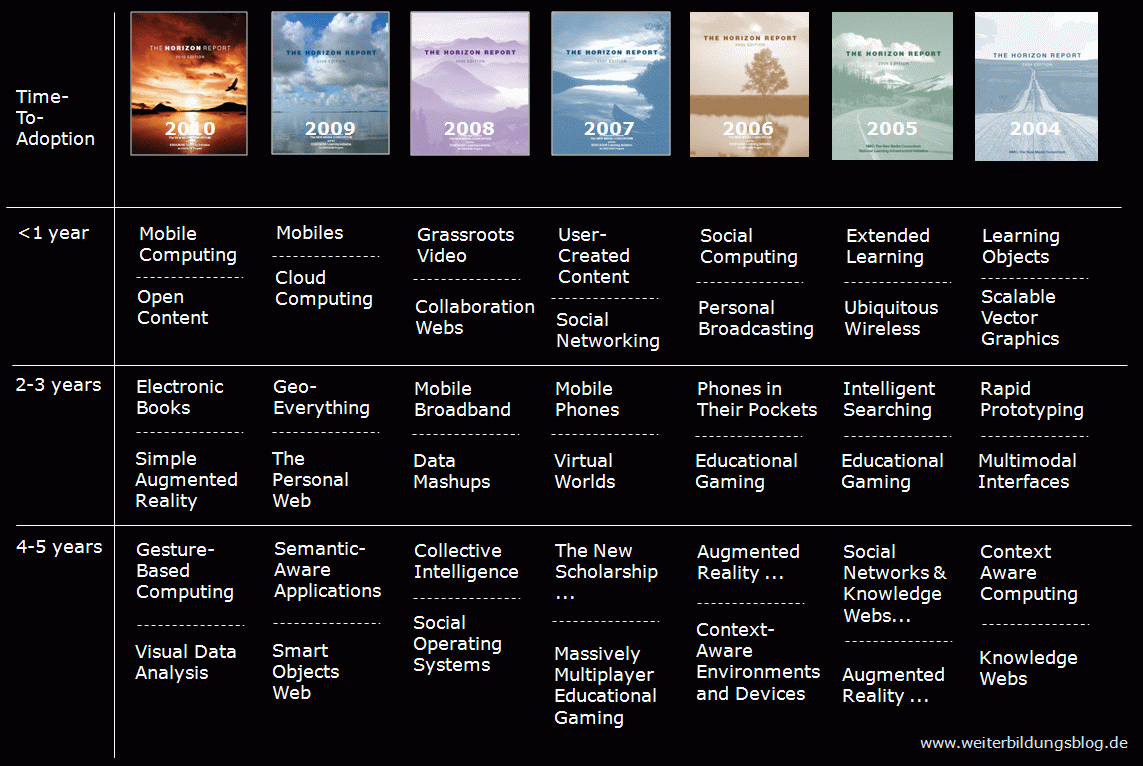
Many of you are already very familiar with the annually submitted "Horizon Report" by the New Media Consortium. Trend analysis is one of the most important skills a district-level leader can apply when strategic planning, designing staffing levels, allocating resources, updating polices, and the list goes on.
The NMC has been extraordinarily accurate in their forecasts over the last seven years, as seen below in a graphic that neatly arranges their previous predictions. What is most interesting is both the scalability of some trends versus the one-dimensional/false promise of others.

Recently, the NMC released this year's report, which includes recognition of innovations such as ebooks, augmented reality, game-based learning, and gesture-based learning. Below is NMC's ppt on the 2011 report.
View more presentations from New Media Consortium
NMC, however, is not the only resource a district administrator may look to in order to become more aware of upcoming drivers of change. Gartner's "Hype Cycle" of emerging technology trends is another valuable resource where information may be gleaned and applied. The format of visually seeing the excitement, disenchantment, and realized function of digital-age tools is not only comical put also alerting.

For a more global perspective, the Knowledgeworks Foundation has completed the 2020 Forecast for education, citing catalysts, trends, signals, and learning agents.
So, why look to the horizon? Why pull our heads up from the grindstone (or guillotine)? Does anyone else feel off balance with rapid changes to the learning landscape shifting our equilibrium, and techno experts volleying recommendations without research and careful consideration? Are we as district administrators at somewhat of a disadvantage if not logged on, plugged in, and growing in a personal learning network? Offline school administrators will likely be looking through a myopic, fiscal-year lens, be uninformed of emerging innovations, and recoiling from transformative forces. A visionary leader is predictive in strategic planning, experimental in programming, and engaged in trend analysis. Use the resources above to "turn your brights on" and build an awareness of what's on the horizon!
The NMC has been extraordinarily accurate in their forecasts over the last seven years, as seen below in a graphic that neatly arranges their previous predictions. What is most interesting is both the scalability of some trends versus the one-dimensional/false promise of others.
Recently, the NMC released this year's report, which includes recognition of innovations such as ebooks, augmented reality, game-based learning, and gesture-based learning. Below is NMC's ppt on the 2011 report.
View more presentations from New Media Consortium
NMC, however, is not the only resource a district administrator may look to in order to become more aware of upcoming drivers of change. Gartner's "Hype Cycle" of emerging technology trends is another valuable resource where information may be gleaned and applied. The format of visually seeing the excitement, disenchantment, and realized function of digital-age tools is not only comical put also alerting.
For a more global perspective, the Knowledgeworks Foundation has completed the 2020 Forecast for education, citing catalysts, trends, signals, and learning agents.
So, why look to the horizon? Why pull our heads up from the grindstone (or guillotine)? Does anyone else feel off balance with rapid changes to the learning landscape shifting our equilibrium, and techno experts volleying recommendations without research and careful consideration? Are we as district administrators at somewhat of a disadvantage if not logged on, plugged in, and growing in a personal learning network? Offline school administrators will likely be looking through a myopic, fiscal-year lens, be uninformed of emerging innovations, and recoiling from transformative forces. A visionary leader is predictive in strategic planning, experimental in programming, and engaged in trend analysis. Use the resources above to "turn your brights on" and build an awareness of what's on the horizon!
Subscribe to:
Posts (Atom)